
Certification
Checking the Status of Your Application
- Login to TEACH
- Click "TEACH Online Services".
- Under Inquiry Links, click "Account Information".
- Click "Certificates" and then click the "GO" button next to the list.
Application Status
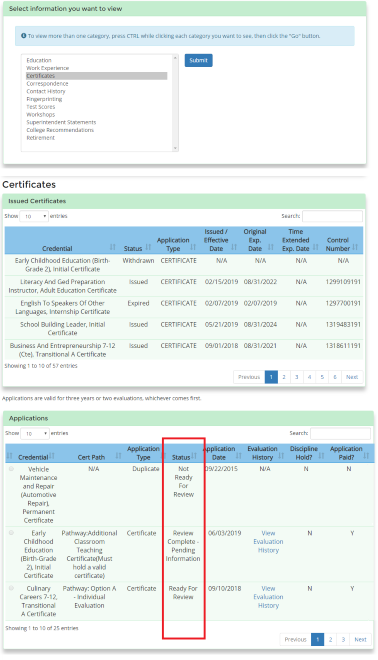
- Not Ready for Review: Your application is not currently in line for review. One of the following may be required:
- Payment: To pay for an application, refer to: TEACH Help for Applicants.
- College Recommendation: If you entered a program code during the application process and have paid for your application, contact the certification officer at your New York State college or university for additional information.
- Official Transcripts: To submit official transcripts, refer to: Submitting Documents to the Office of Teaching Initiatives.
- Ready for Review: Your application is currently in line for review. Applications are evaluated based upon the order in which they enter "Ready for Review" status. Applications can take up to 16 weeks to process.
- Review Complete – Pending Information: An evaluation has been completed and deficiencies have been found. A "Notice of Uncompleted Requirements" letter has been mailed or e-mailed to you.
- Upon receipt of new documentation, your application will go back in to the “Ready for Review” status and can take up to 16 weeks to process.
- Upon receipt of new documentation, your application will go back in to the “Ready for Review” status and can take up to 16 weeks to process.
- Evaluation Complete – Pending Final Review: An evaluation has been completed and all requirements have been met. The application status will change to "Issued" after the TEACH system completes a final review overnight, if there are no pending actions in TEACH. Pending actions include:
- Pending name change request
- Pending Social Security Number change request
- OSPRA hold for fingerprinting
- Issued: The certificate has been issued. To determine if you will receive a paper certificate in the mail, refer to: Printed Certificates.
- Disapproved: Your application has been manually evaluated twice and it has been determined that you have not met the requirements for the certificate. The application fee is non-refundable and non-transferable.
- Expired: Your certificate is expired. The certificate can no longer be used for employment in a New York State public school.
- Review Not Complete: An evaluator has completed an initial review, and is holding the application for further review.
- Revoked/Surrendered/Suspended: The certificate has been revoked, surrendered, or suspended.
- Withdrawn: The applicant has requested that the application be withdrawn or the Office of Teaching Initiatives staff have withdrawn the application based on other evaluations.
View Evaluation History
To view the history of your application, click on the “View Evaluation History” link.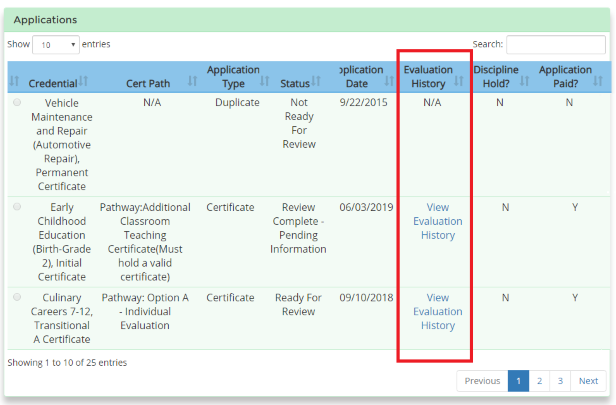
- Manual Evaluation: An evaluator has reviewed your application.
- Automated Evaluation due to receipt of… : New information has been entered onto the TEACH system and the computer has completed an automated evaluation.
- Certain requirements cannot be verified by an automated evaluation; they will receive a manual evaluation. For example, experience must be reviewed by an evaluator and manually marked as “Verified Met”.
- Workshops: A workshop was added to your account.
- Exam: An exam score was posted to your account.
- Pathway Change: The application pathway was changed. For more information, refer to Pathways to Certification.
- Certain requirements cannot be verified by an automated evaluation; they will receive a manual evaluation. For example, experience must be reviewed by an evaluator and manually marked as “Verified Met”.
Last Updated:
June 21, 2023